
Authorizing GitHub in CICDoo with Organization Access
Overview
This guide explains how to authorize GitHub inside CICDoo and grant access to repositories that belong to a GitHub organization.
This is commonly required when:
- Your repositories are owned by a GitHub organization
- CICDoo cannot see organization repositories
- Deployment creation fails because repositories are missing
- GitHub OAuth was previously authorized without organization approval
Step 1 — Open GitHub Integrations in CICDoo
Inside CICDoo:
- Go to Settings
- Open Integrations
- Click Connect GitHub
You will be redirected to GitHub authorization.
Step 2 — Authorize the GitHub OAuth Application
GitHub will ask you to authorize the CICDoo GitHub application.
Click:
- Authorize
- Or Configure Access if already connected
If your repositories are personal only, authorization is usually completed immediately.
For organization repositories, continue with the next steps.
Step 3 — Grant Organization Access
After authorization, GitHub may show a message similar to:
“This application is requesting access to organization repositories.”
For each organization:
- Click Grant
- Or click Request Access if approval is required by organization administrators
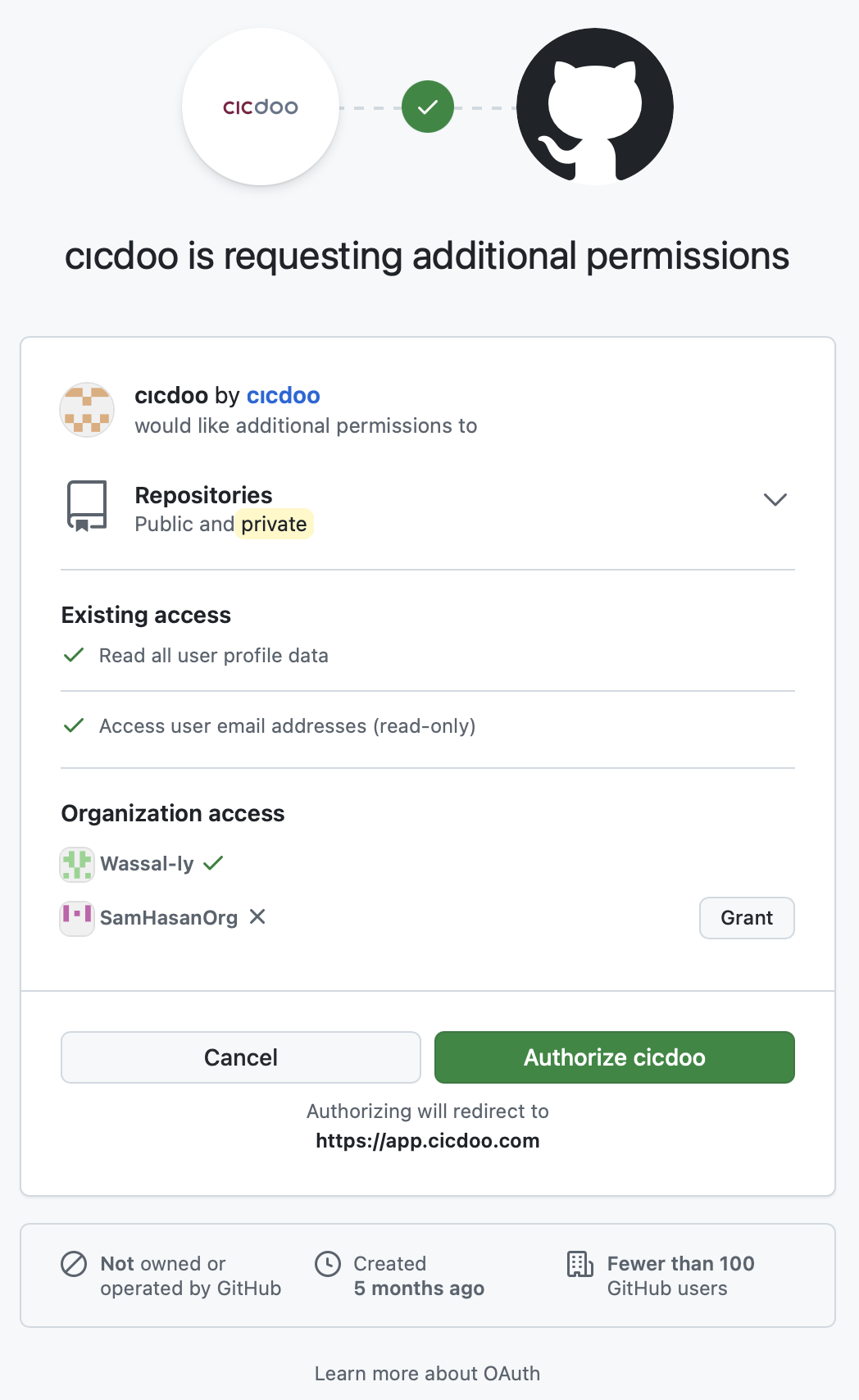
Example organizations:
- company-dev
- engineering-team
- my-startup
Step 4 — Approve Third-Party Application (Organization Admins)
If your GitHub organization restricts third-party applications:
- Open GitHub organization settings
- Navigate to:
- Settings
- Third-party access
- OAuth App policy
Organization administrators must approve the CICDoo OAuth application.
Useful Links
- CICDoo: https://cicdoo.com
- GitHub OAuth Applications: https://github.com/settings/connections/applications
- GitHub Organization Settings: https://github.com/organizations/YOUR_ORG/settings/profile
- GitHub OAuth Documentation: https://docs.github.com/en/apps/oauth-apps/building-oauth-apps
Step 5 — Verify Repository Visibility
Return to CICDoo and refresh repositories.
Your organization repositories should now appear.
If repositories are still missing:
- Disconnect GitHub from CICDoo
- Reconnect again
- Ensure organization approval was granted
- Verify repository permissions inside GitHub
Common Issues
Organization repositories do not appear
Usually caused by:
- Organization access not granted
- OAuth app pending approval
- GitHub SSO restrictions
- Repository access limited to selected repositories only
“Request Pending” on GitHub
An organization administrator must approve the application.
Repositories were visible before but disappeared
This may happen if:
- GitHub permissions changed
- Organization security policies changed
- OAuth token expired or was revoked
Reconnect the integration.
Security Recommendations
- Use least-privilege repository access where possible
- Restrict deployment permissions to required repositories only
- Review third-party GitHub applications regularly
- Use organization audit logs for tracking authorization activity
Troubleshooting Checklist
Before contacting support, verify:
- GitHub account is part of the organization
- Organization admin approved the OAuth app
- Repository access is enabled
- CICDoo integration was reconnected after approval
- GitHub SSO authorization is completed if enforced
Conclusion
Once organization access is granted, CICDoo can discover and deploy repositories owned by your GitHub organization.
If access issues continue after approval, reconnecting the GitHub integration usually resolves cached permission states.
Updated 6 months ago